Workflow: A Full Pipeline
Workflow Diagram
Section titled “Workflow Diagram”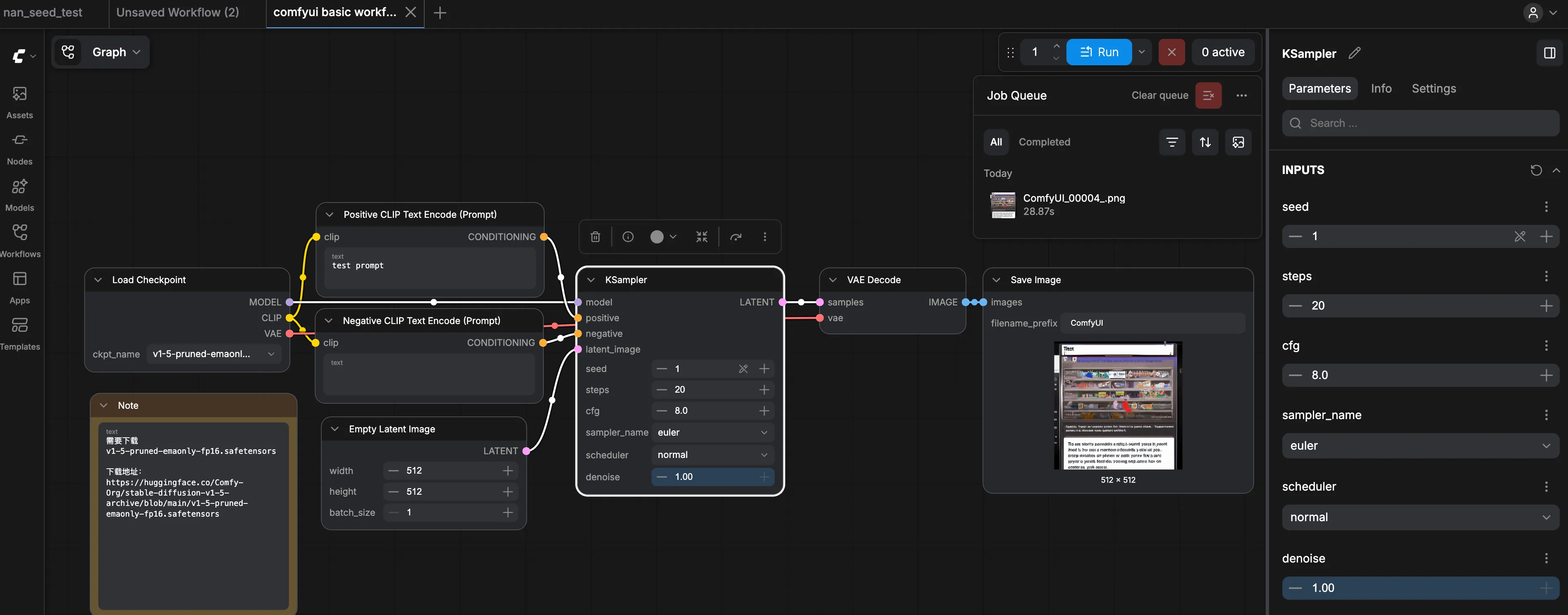
Workflow source code is at the bottom of this page 👇
Walking Through It in Plain Terms
Section titled “Walking Through It in Plain Terms”The reference workflow source file is at the bottom of this page as a JSON file. Download it and drag it directly into ComfyUI to open it.
Picture the whole diagram as an assembly line: raw materials enter on the left, finished product exits on the right. Those curvy lines are just “one step handing off to the next.”
First: Three Ingredients — Painter, Prompt, Canvas
Section titled “First: Three Ingredients — Painter, Prompt, Canvas”1) CheckpointLoaderSimple — pick a “painter package”
The node name translates literally to “checkpoint loader (simple version).” All you need to know: this is where you select the model file.
It answers: who’s painting today, and in what style? The same node also wires up CLIP (to understand prompts) and VAE (the translator) for use downstream.
2) Two CLIPTextEncode nodes — one positive, one negative
You’ll see two text nodes, typically titled something like “Positive / Negative CLIP Text Encode”: one for “what I want,” one for “what I don’t want.”
Don’t get hung up on the word CLIP — just know that you’re not drawing yet; you’re translating your words into machine instructions. The translated output is called conditioning, and KSampler depends entirely on it.
3) EmptyLatentImage — lay out an “invisible draft canvas”
The word “latent” can be treated as “a mid-stage draft that hasn’t become an image yet.” This node sets: width, height, and how many images to generate at once.
You can’t see anything yet — you’re just defining the canvas dimensions and batch size.
Middle: KSampler — the Relentless Revision Machine
Section titled “Middle: KSampler — the Relentless Revision Machine”KSampler (often labeled KSampler / Sampler in the UI)
Think of it as “a machine that revises endlessly”: it takes the model, the two conditioned prompt encodings, and the latent canvas from EmptyLatentImage, and starting from a cloud of noise, revises step by step toward what you asked for.
The steps you see in the node are like “how many drafts to go through”: more usually means cleaner; too many wastes time — 20 to 30 is plenty to start experimenting.
Output: A Visible Image
Section titled “Output: A Visible Image”VAEDecode — decode the draft into a real image
What KSampler outputs is still a latent. VAE here does one thing: Decode it — convert it into the actual image you can see.
Washed-out, muddy, or dull colors are often caused by a VAE that doesn’t match the model — something to investigate when you hit that problem.
SaveImage — write to disk
The final node saves the result to your hard drive. The filename prefix is set here.
One Sentence to Tie It Together (with node names)
Section titled “One Sentence to Tie It Together (with node names)”Left to right: CheckpointLoaderSimple → two CLIPTextEncode → EmptyLatentImage → KSampler → VAEDecode → SaveImage; the Note node on the side is just a memo and doesn’t affect generation.
The Introduction told this same story as a narrative; this page is the same pipeline rendered as a blueprint in the software.
Reference
Section titled “Reference”{ "id": "e6e10079-1a89-4fe2-abb4-5b92c57dfea7", "revision": 0, "last_node_id": 8, "last_link_id": 9, "nodes": [ { "id": 1, "type": "CheckpointLoaderSimple", "pos": [ 26, 200 ], "size": [ 315, 130.65625 ], "flags": {}, "order": 0, "mode": 0, "inputs": [], "outputs": [ { "name": "MODEL", "type": "MODEL", "slot_index": 0, "links": [ 1 ] }, { "name": "CLIP", "type": "CLIP", "slot_index": 1, "links": [ 3, 5 ] }, { "name": "VAE", "type": "VAE", "slot_index": 2, "links": [ 8 ] } ], "properties": { "Node name for S&R": "CheckpointLoaderSimple" }, "widgets_values": [ "v1-5-pruned-emaonly-fp16.safetensors" ] }, { "id": 2, "type": "CLIPTextEncode", "pos": [ 380, 100 ], "size": [ 350, 116 ], "flags": {}, "order": 3, "mode": 0, "inputs": [ { "name": "clip", "type": "CLIP", "link": 3 } ], "outputs": [ { "name": "CONDITIONING", "type": "CONDITIONING", "slot_index": 0, "links": [ 4 ] } ], "title": "Positive CLIP Text Encode (Prompt)", "properties": { "Node name for S&R": "CLIPTextEncode" }, "widgets_values": [ "test prompt" ] }, { "id": 3, "type": "CLIPTextEncode", "pos": [ 378.6660166491872, 262.2430027530152 ], "size": [ 350, 116 ], "flags": {}, "order": 4, "mode": 0, "inputs": [ { "name": "clip", "type": "CLIP", "link": 5 } ], "outputs": [ { "name": "CONDITIONING", "type": "CONDITIONING", "slot_index": 0, "links": [ 6 ] } ], "title": "Negative CLIP Text Encode (Prompt)", "properties": { "Node name for S&R": "CLIPTextEncode" }, "widgets_values": [ "" ] }, { "id": 4, "type": "EmptyLatentImage", "pos": [ 388.0533068956476, 427.8901333901416 ], "size": [ 315, 144 ], "flags": {}, "order": 1, "mode": 0, "inputs": [], "outputs": [ { "name": "LATENT", "type": "LATENT", "slot_index": 0, "links": [ 2 ] } ], "properties": { "Node name for S&R": "EmptyLatentImage" }, "widgets_values": [ 512, 512, 1 ] }, { "id": 5, "type": "KSampler", "pos": [ 780, 200 ], "size": [ 315, 317.328125 ], "flags": {}, "order": 5, "mode": 0, "inputs": [ { "name": "model", "type": "MODEL", "link": 1 }, { "name": "positive", "type": "CONDITIONING", "link": 4 }, { "name": "negative", "type": "CONDITIONING", "link": 6 }, { "name": "latent_image", "type": "LATENT", "link": 2 } ], "outputs": [ { "name": "LATENT", "type": "LATENT", "slot_index": 0, "links": [ 7 ] } ], "properties": { "Node name for S&R": "KSampler" }, "widgets_values": [ 1, "fixed", 20, 8, "euler", "normal", 1 ] }, { "id": 6, "type": "VAEDecode", "pos": [ 1150, 200 ], "size": [ 225, 72 ], "flags": {}, "order": 6, "mode": 0, "inputs": [ { "name": "samples", "type": "LATENT", "link": 7 }, { "name": "vae", "type": "VAE", "link": 8 } ], "outputs": [ { "name": "IMAGE", "type": "IMAGE", "slot_index": 0, "links": [ 9 ] } ], "properties": { "Node name for S&R": "VAEDecode" }, "widgets_values": [] }, { "id": 7, "type": "SaveImage", "pos": [ 1400, 200 ], "size": [ 415, 84 ], "flags": {}, "order": 7, "mode": 0, "inputs": [ { "name": "images", "type": "IMAGE", "link": 9 } ], "outputs": [], "properties": { "Node name for S&R": "SaveImage" }, "widgets_values": [ "ComfyUI" ] }, { "id": 8, "type": "Note", "pos": [ 34.52708770319889, 391.9420719716832 ], "size": [ 317.5625, 314.984375 ], "flags": {}, "order": 2, "mode": 0, "inputs": [], "outputs": [], "properties": {}, "widgets_values": [ "需要下载\nv1-5-pruned-emaonly-fp16.safetensors\n\n下载地址:\nhttps://huggingface.co/Comfy-Org/stable-diffusion-v1-5-archive/blob/main/v1-5-pruned-emaonly-fp16.safetensors" ], "color": "#432", "bgcolor": "#653" } ], "links": [ [ 1, 1, 0, 5, 0, "MODEL" ], [ 2, 4, 0, 5, 3, "LATENT" ], [ 3, 1, 1, 2, 0, "CLIP" ], [ 4, 2, 0, 5, 1, "CONDITIONING" ], [ 5, 1, 1, 3, 0, "CLIP" ], [ 6, 3, 0, 5, 2, "CONDITIONING" ], [ 7, 5, 0, 6, 0, "LATENT" ], [ 8, 1, 2, 6, 1, "VAE" ], [ 9, 6, 0, 7, 0, "IMAGE" ] ], "groups": [], "config": {}, "extra": { "ds": { "scale": 0.7906301824212272, "offset": [ 97.81842389879395, 366.150850485055 ] }, "frontendVersion": "1.44.15" }, "version": 0.4}